

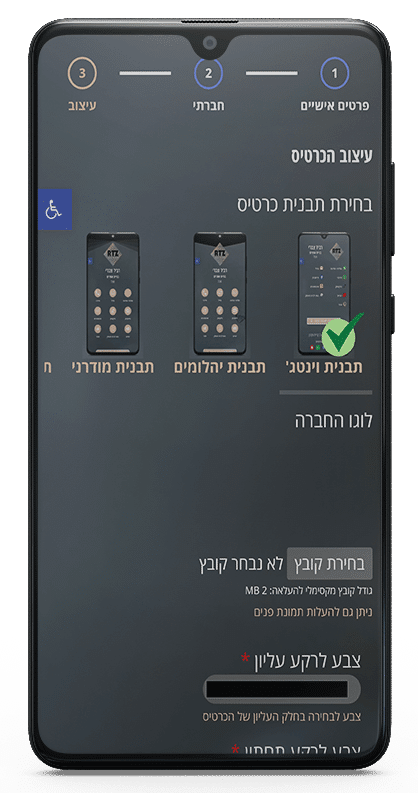


Our platform offers 11 unique templates for building your digital business card.
More templates and additional special features will be added over time.
To choose a template, simply click the template you want:
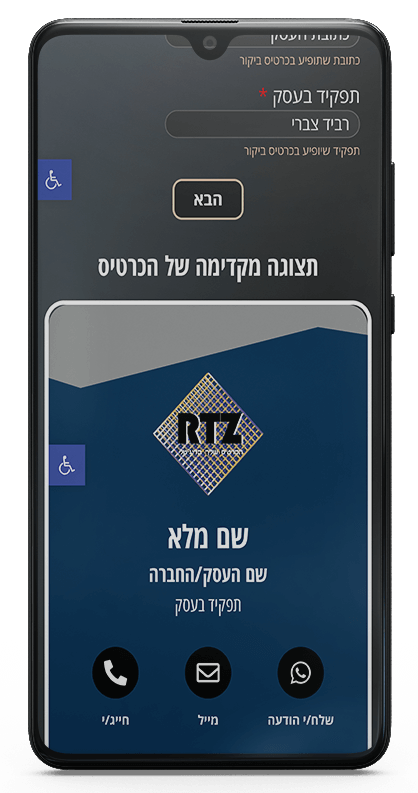
You will then see the template in the preview screen with your own details and colors.
After creating your card, you can easily change both your information and the card template.
When you are logged in to the website, you will see an Edit Card button. Just like during card creation, choose a different template and click “Update”.
אתר rtz-dbz.com (להלן: “המפעיל”) מפעיל מערכת ליצירת כרטיסי ביקור דיגיטליים. המפעיל מכבד את פרטיות המשתמשים ופועל בהתאם לחוק הגנת הפרטיות, התשמ”א–1981, תיקון 13 ותקנות הגנת הפרטיות (אבטחת מידע), התשע”ז–2017.
השימוש באתר ובכרטיסי הביקור מהווה הסכמה למדיניות זו.
המפעיל עשוי לאסוף מידע לצורך תפעול ושיפור השירות, לרבות:
המפעיל אינו שומר מידע רגיש ואינו עושה שימוש נוסף במידע מעבר לנדרש להפעלת המערכת, אלא אם נדרש על פי דין.
כרטיסי ביקור שנוצרים באמצעות המערכת כוללים טופס יצירת קשר המאפשר למבקרים להשאיר פרטים כגון:
מובהר כי מחזיק הכרטיס הדיגיטלי (המשתמש) הוא בעל המאגר לגבי המידע שהושאר אליו, והמפעיל משמש כעובד עיבוד בלבד ביחס למידע זה. המפעיל אינו עושה כל שימוש במידע ואינו מעביר אותו לצדדים שלישיים, מעבר לשמירה טכנית והעברתו לבעל הכרטיס. האחריות לשמירת המידע, אבטחתו, מחיקתו ושימושו מוטלת על בעל הכרטיס בלבד.
ביצירת כרטיס ביקור דיגיטלי, המשתמש מצהיר כי הוא עומד בהוראות חוק הגנת הפרטיות ותקנות אבטחת מידע, וכי כל שימוש שיעשה במידע שהמבקרים משאירים בכרטיס הוא באחריותו בלבד. המשתמש מתחייב ליידע את המבקרים לגבי מטרות איסוף המידע, לשמור ולעבד את המידע בהתאם לדין, ולפעול לפי חובות רישום מאגר מידע במידה שנדרש. המפעיל לא יישא בכל אחריות לשימוש שיבצע בעל הכרטיס במידע שנמסר לו דרך הכרטיס.
בהתאם לחוק, כל אדם רשאי לעיין במידע שנשמר עליו, לבקש לתקן מידע שגוי ולבקש מחיקת מידע, בכפוף למגבלות הדין.
פניות בנושא זה יש לשלוח לכתובת: rtz.digital@gmail.com
האתר עושה שימוש בקובצי Cookies לצורך הפעלה תקינה של השירות, אבטחת מידע, ניתוח תעבורה ושיווק מותאם.
ניתן לחסום או למחוק Cookies באמצעות הגדרות הדפדפן, אך חסימתם עלולה לפגוע בחוויית השימוש באתר.
המפעיל מיישם אמצעי אבטחה מיטביים בנוסף לדין, אך אינו יכול להבטיח הגנה מוחלטת מפני פריצות או גישה בלתי מורשית.
המפעיל מאפשר לכל בעל כרטיס להוסיף מדיניות פרטיות משל עצמו, המפרטת את אופן עיבוד המידע על ידו. המדיניות האישית של בעל הכרטיס מופיעה להלן כפי שסופקה על ידו ואחריותה עליו בלבד:
המפעיל רשאי לעדכן מעת לעת את מדיניות הפרטיות. שינויים מהותיים יתועדו ויופיעו בעמוד זה.
תאריך עדכון אחרון: 2025